Build a session around what the players should learn
Choose an objective, then build the activities that help the group work on it. The football session planner separates practice type, objective, organisation, instructions, coaching points and progressions. Add timings so the running order reflects the time you actually have.
For a possession activity, you might define the area, player numbers, passing options and the constraint you want to change. Those are details you choose as the coach. The plan holds them together so you can reopen and adapt the activity instead of recreating your notes.
Show the idea with a pitch diagram
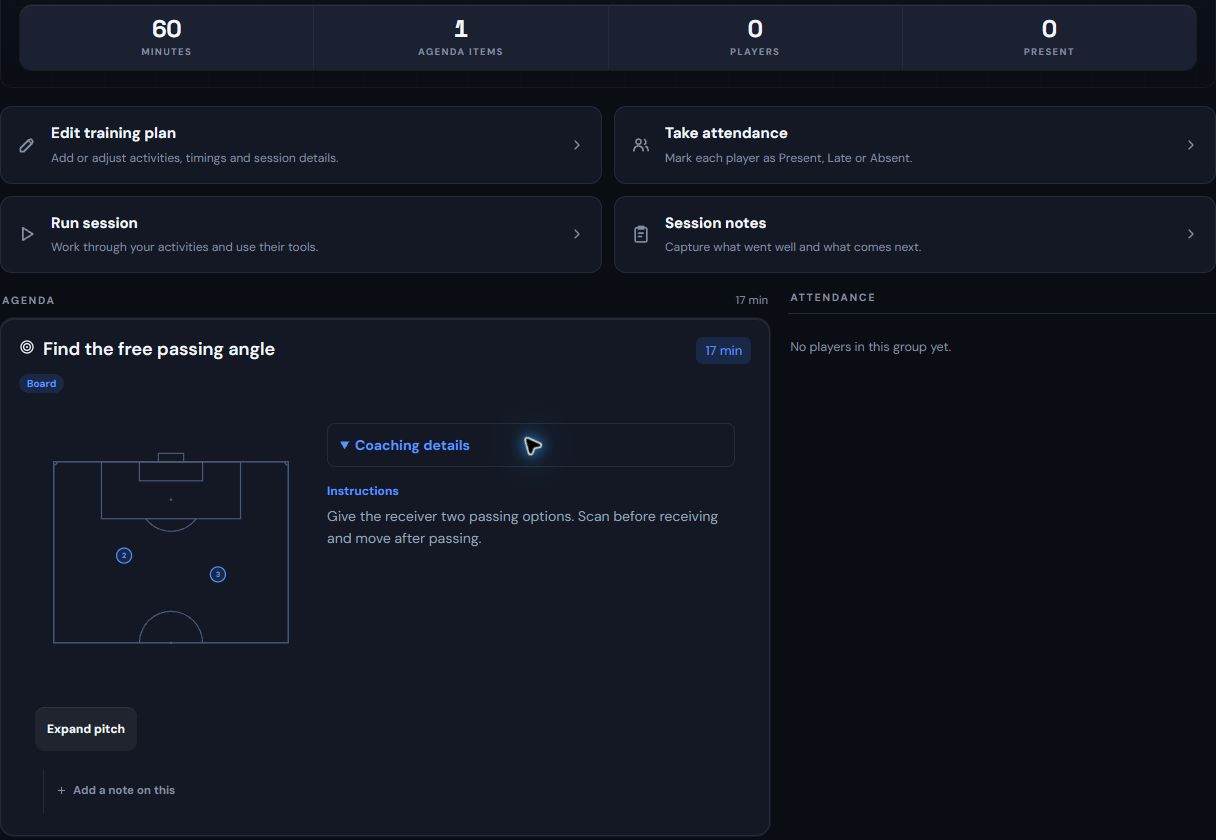
Save a pitch diagram with an activity and open it when you need to explain the setup. Football tactics tools support pitch-based preparation, including formations, set pieces and responsibilities. Use the diagram to make the coaching point visible.
A diagram is most useful alongside a short explanation of what players should recognise. For example, a coach can show two passing options and ask players to scan before receiving. The example illustrates a practice idea; the app does not automatically generate or validate a complete training programme.
Keep preparation useful during training
The session view brings the plan, attendance, activity tools and notes into one place. Open Run session to work through the running order, inspect the saved pitch preview and reopen the coaching details when needed.
Use the football session-planning guide for a closer look at objectives, timings and activity delivery. You can prepare an outline first and add detail later; optional coaching fields do not have to become a barrier to saving the plan.
Prepare for matches and record what you observe
Manual football scouting lets coaches record their own observations about an opponent. Match tools provide line-up, event and report views for the available fixtures. Recorded events and the competition configuration determine what the match record can show.
Friendlies and supported two-leg reports have their own workflows. Keep a clear distinction between an observation, a manually recorded event and a statistic derived from verified data. Clutch does not currently offer automated football scouting PDFs, expected-goals calculations, GPS tracking or the basketball shot-chart dashboard for football.
Follow development beyond the final whistle
Use the coach’s Pathway workspace to connect plans and reviews to a player’s next steps. Explicitly published feedback can be seen by the player in My development, while private staff notes stay separate.
The useful question is what happens after a review. Give the player a focused practice target and use the next review to discuss progress. Sharing information with players, parents or authorised recruiting viewers follows the existing consent and access controls.
Prepare independently, connect to a club when ready
You can create a football coaching profile before joining a club. After email confirmation and required consent, choose football and complete the essential details. My preparation beside your profile lets an independent coach save private session plans and pitch diagrams.
Joining the correct club is required to assign work to its players. Your plan and permissions determine the tools available. Nexus, the recruitment area, starts with a private coaching-profile preview so you can understand visibility before publishing your experience.
Football here means association football, also called soccer. This release covers outdoor senior and youth football; futsal, beach football and multi-sport switching are outside its current scope.
Questions, answered
Questions from coaches
Is this also soccer coaching software?
Yes. Football and soccer refer to association football here. The current tools cover outdoor senior and youth football.
Can I plan sessions before my club joins?
Yes. Independent football coaches can save private plans and pitch diagrams in My preparation. Joining a club is required before assigning work to its players.
Are these the same tools as basketball with new labels?
The football workspace uses football profile details, pitch diagrams, practice fields and match events. Basketball statistical reports and shot charts are not presented as football tools.
Does Clutch generate football scouting reports from live feeds?
No automated football scouting PDF or football stats-file importer is included. Coaches can record manual scouting observations, and match information depends on the events recorded and published.